

Looking to increase your quality leads? We can do that. Our Lead Conversion Engine’s broad, extensive capabilities easily convert traffic into verified leads for B2C and B2B environments.
We can make your site do everything you need it to, and some things you may not have thought of yet. Does the data you’re collecting belong to real people, or is it spam? Do you know which lead generation methods are most effective for you? We create sites with several built-in layers of automatic verification and metric analysis to find out. Our comprehensive Lead Registration System can put lead capture forms on any page of your site, route data through a central system and offer payloads ranging from emailed documents to enhanced site access, and more. The system can also automatically push lead information into a local database, email, or CRM system like SalesForce, reducing employee workloads and eliminating implementation delays.
The moment a registrant completes a form on your website, our exclusive MagicLeads Engine processes the data through the following steps:
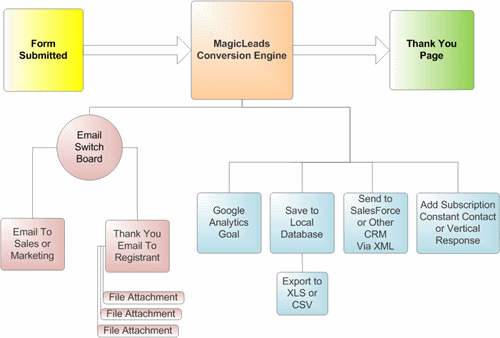
Email Notification to Sales/Marketing Team
Appropriate sales or marketing staff receives an email with the lead data, including visible form fields (name, phone number, email, etc.), hidden fields (files requested, lead source, whether the data was sent to SalesForce), and automatic fields (origination URL, page submitted from, and IP Address).
Email Response to Registrant
Registrants receive e-mails (with or without file attachments) thanking them for submitting their information and notifying them that appropriate actions will be taken, depending on the form submitted.
Lead Data Backup
Lead data is saved to a local database via XLS or CSV file. You can easily export these files from your Content Management System.
Tracking and Analysis
Google Analytics tracks the lead according to your particular objectives, via the Lead Registration System.
MagicLamp puts your company-specific tracking markers in place, and the system evaluates these based on particular goals or events.
Send to SalesForce or other CRM System
We can set up Web-to-Lead functionality in SalesForce, including all potential form fields (files, sublead, origination URL), and send the form results to SalesForce via XML. MagicLamp will set up the conversion engine using your SalesForce Account ID, and add all custom field names. Typically, this is a simple, one-time operation.
MagicLamp can also help you plan conversion maps to clarify conversion points and flows within your site:
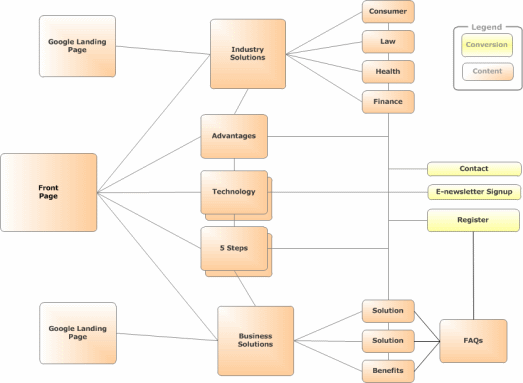
We can also optimize your site for search engines, increasing organic leads, and create business-specific functionality that makes your site work the way your company does. MagicLamp is a smart choice for lead conversion sites that works the way you need them to.
